Device selection
G-Code Creation: [Text] [Barcode] [Image] [Simple shapes] [Jog path] [Extensions]
Workpiece: [Probing] [Height map]
Machine: [Laser tools] [Coordinate systems] [DIY Control] [Camera] [Process automation]
back to [Menu]
Laser
The "Laser" tab needs to be selected to generate G-Code specifically for laser-cutter or -engraver.
Plotter
The "Plotter" tab provides options for use of a RC-servo or Z-axis to raise or lower a pen.
Router
The "Router" tab needs to be selected to generate GCode only for a Z-axis with some options.
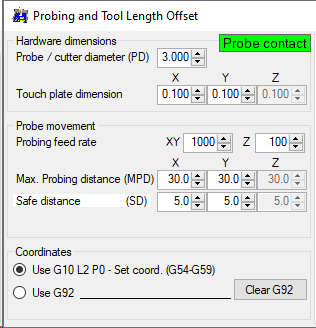
General settings are:
- Probe / cutter diameter: needed to calculate offsets, if 'Set tool center as zero' is enabled.
- Touch plate dimension: thickness of touch-plate or aluminum-tape, needed to calculate offsets.
If a conducting workpiece is used, these values needs to be set to zero. - Probing feed rate: speed of the probe when moving toward the edge.
- Max. Probing distance: range / distance to move to find the edge.
- Save distance: distance from edge to move to finally - after resetting the coordinates.
Must be higher than touch plate thickness. - Use G10 L2 P0: sets the actual coordinate system after successful probing.
- Use G92: set the coordinate system offset instead.